
Executive Summary
- AiTM phishing bypasses MFA by stealing authenticated session cookies — after MFA completes successfully
- Legitimate SharePoint Online links and Google redirect wrappers defeat standard email security scanning
- Conditional Access alone does not prevent session replay from a stolen cookie
- Session trust architecture — not just MFA policy — is the critical control layer
The Setup
A staff member at a nonprofit receives a SharePoint Online link from a colleague they trust. The link is real — it comes from a legitimate Microsoft 365 tenant, from a real account, pointing to an actual SharePoint document. Every security indicator looks clean.
They click it.
Within seconds, their browser is navigating through a Google redirect wrapper to a phishing proxy designed to look like Microsoft Teams. If they don't notice — and most people don't — the attacker collects their session token in real time. MFA fires. The victim completes it. The attacker gets the authenticated session anyway.
This happened this week. The account used as the delivery vehicle was already compromised. The phishing proxy is live infrastructure at teams.cryptoveil.co.uk. The attack pattern matches Scattered Spider / UNC3944 — a threat actor with a documented history of hitting under-resourced organizations with exactly this technique.
The operationally dangerous part of AiTM attacks is not that they are sophisticated. It is that the organization believes MFA protected the account — while the attacker is already operating inside a valid authenticated session. Every alert, every sign-in log, every compliance report says authentication succeeded. Because it did. The victim completed MFA. The attacker just captured the result.
That gap between "MFA completed" and "the session is now compromised" is invisible to most monitoring configurations. If your detection depends on a failed authentication event, you will not see this.
Why MFA Doesn't Stop This
Adversary-in-the-Middle (AiTM) phishing doesn't break MFA. It proxies through it.
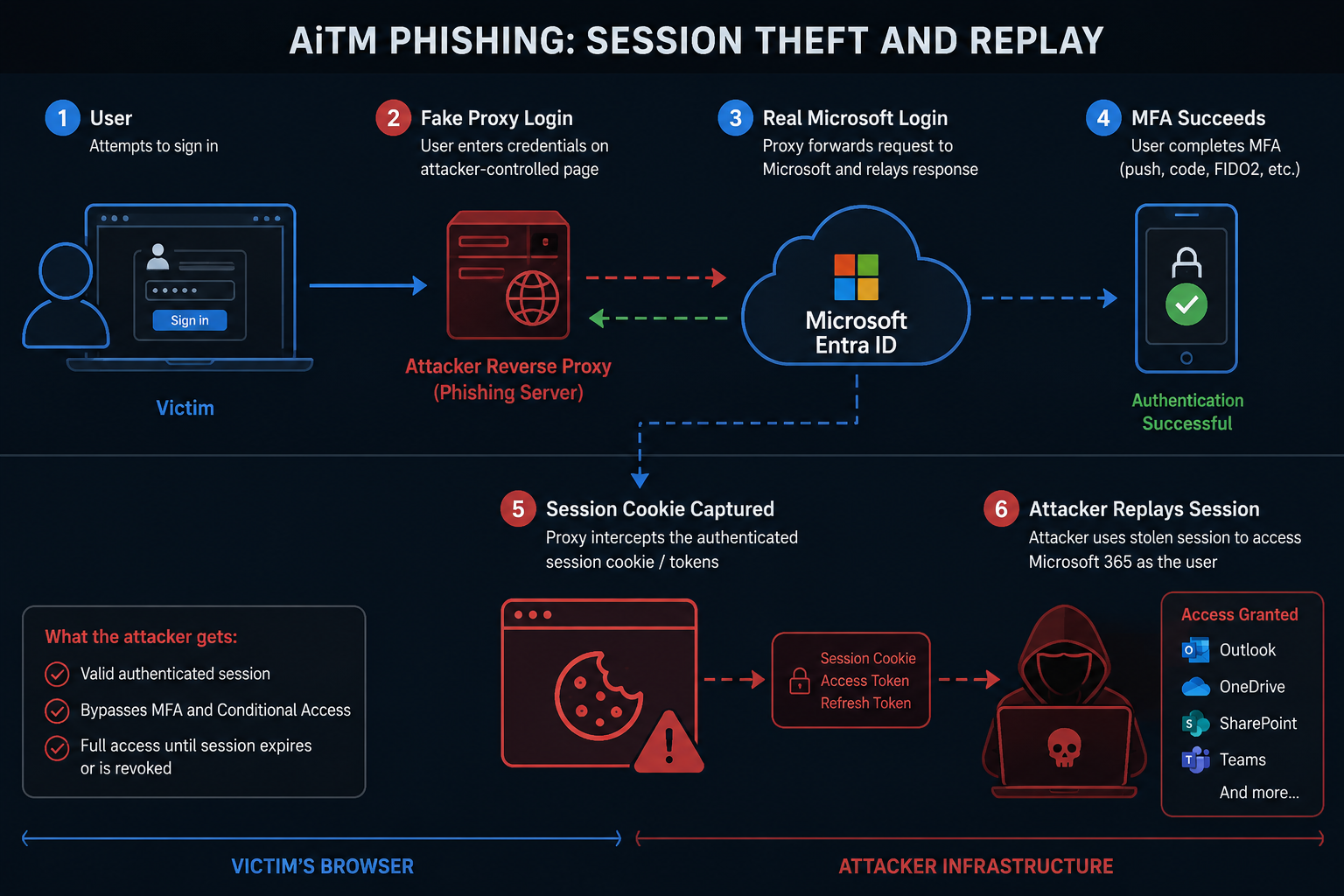
Here's the attack chain in plain terms:
Stage 1 — Trusted delivery
The attacker sends a legitimate SharePoint Online link from a compromised account in the target's trusted network. Email security tools see a real Microsoft domain. Link scanners see a real SPO URL. Nothing flags.
Stage 2 — Google redirect wrapper
The SharePoint document contains a link wrapped in Google's redirect service (google.co.uk/url?q=...). This is deliberate. Google domains are whitelisted by virtually every email gateway and web proxy. The real destination — the phishing proxy — never appears in any scanned URL.
Stage 3 — AiTM proxy
The victim lands on a reverse proxy that sits between them and the real Microsoft login page. Every interaction — username, password, MFA challenge — flows through the proxy transparently. The victim sees a real authentication experience. The attacker sees everything, including the session cookie issued after successful MFA.
Stage 4 — Session replay
The attacker injects the stolen session cookie into their own browser. MFA is irrelevant at this point. The session is already authenticated. Microsoft 365 has no way to distinguish the attacker's request from the legitimate user's request — because the cookie is valid.
This is not a vulnerability in MFA. It is a gap in session trust architecture.
What Attackers Do With a Stolen Session
A stolen session cookie is not reconnaissance material. It is immediate operational access — the same access the legitimate user has, with no additional authentication required.
Business Email Compromise (BEC): The attacker reads recent email threads to understand active deals, relationships, and payment flows. They send wire transfer requests or vendor payment updates from the user's actual address, from a valid authenticated session. No spoofing. No impersonation of domain. The email comes from the real account.
SharePoint and OneDrive exfiltration: Contracts, financial records, HR files, engineering documents — anything the user can access is immediately readable and downloadable. Exfiltration takes minutes. Detection often takes days.
Teams impersonation: The attacker reads existing conversations, understands internal context, and sends messages as the user. In environments where Teams is used for approvals, financial decisions, or vendor coordination, this is a direct manipulation surface.
Downstream SaaS access: If the user's M365 identity is used for SSO into other systems — Salesforce, Workday, DocuSign, GitHub, Jira — a valid M365 session may carry those permissions. One stolen session cookie can be the entry point to multiple systems with no additional authentication.
Persistence: Attackers who have time inside a valid session sometimes register additional MFA methods or OAuth applications — creating access that survives session expiry, password resets, and initial incident response actions.
The attacker does not need to compromise authentication again. They already have a valid session. The question is how much they can reach before the session expires or is revoked — and how quickly you notice.
Why Compliant Environments Still Get Hit
Most Microsoft 365 environments are configured to satisfy compliance requirements, not to constrain session trust. Those are different things.
A compliant environment typically has:
- MFA required for all users ✅
- Defender for Office 365 with Safe Links ✅
- Conditional Access policies enforcing MFA ✅
None of these controls detect or block an AiTM attack where:
- The delivery came from a legitimate tenant
- The redirect used a trusted domain (Google)
- The attacker never directly authenticated — they replayed a valid post-MFA session
The compliance checkbox says "MFA is on." The session trust gap says "the protection MFA was intended to provide was bypassed through session replay."
Where Detection Fails in Production
Safe Links: Scans the SPO URL, sees a real Microsoft document. Passes.
Defender for Office 365: Evaluates the sender domain, sees a legitimate Microsoft 365 tenant. Passes.
Conditional Access: The attacker's session replay arrives with a valid token from a new IP. Without IP-based or device-based token binding, CA has nothing to enforce against.
Sign-in logs: The initial authentication shows as successful — because it was. The victim completed MFA. The attacker's subsequent access using the stolen cookie appears as a non-interactive sign-in from an unfamiliar IP. Without active monitoring on non-interactive sign-ins, this goes unnoticed.
The detection window is the redirect chain. If your users can recognize an unexpected redirect through a Google URL wrapper to an unfamiliar domain, you have a human detection layer. Most don't.
Signs Your Environment May Already Be Exposed
You do not need to have experienced an AiTM incident to have AiTM exposure. These configuration patterns create the conditions:
- MFA permitted from unmanaged devices — a session originating from an unmanaged device can be stolen and replayed from any other device. Compliant device requirements close this.
- Long session persistence or "Remember MFA" enabled — sessions valid for 7–14 days dramatically extend the window an attacker can operate on a stolen cookie. Sign-in frequency controls shorten it.
- SMS or voice call still available as MFA fallback — phishable and SIM-swappable. If Authenticator is the primary method but SMS is still registered as fallback, an attacker can trigger the weaker method.
- No token protection configured — without token protection, a stolen access token is valid from any device. Token protection binds it to the device that authenticated.
- No Continuous Access Evaluation — without CAE, a revoked session may remain valid for up to an hour after revocation. CAE reduces that window to near-real-time.
- Non-interactive sign-ins not monitored — session replay from a stolen cookie typically appears as a non-interactive sign-in from an unfamiliar IP. If your monitoring only watches interactive sign-in failures, session replay goes undetected.
- Legacy authentication still enabled — legacy auth protocols bypass Conditional Access entirely. An attacker who finds a legacy auth endpoint doesn't need a session cookie at all.
- No documented, tested session revocation procedure — when compromise is suspected, how quickly can you revoke all active sessions for the affected user and confirm it worked? If the answer is "we'd have to look it up," that gap matters under time pressure.
None of these are rare configurations. They describe most Microsoft 365 environments that have not had an explicit session trust review.
What Actually Constrains This
Conditional Access can be configured to limit what a valid session token can do — even after MFA is complete. These controls don't prevent token theft, but they dramatically limit what an attacker can do with a stolen session:
Token binding and sign-in frequency
Require re-authentication at defined intervals. A stolen cookie from a morning session expires by afternoon.
Continuous Access Evaluation (CAE)
Allows Microsoft 365 to revoke sessions in near-real time when suspicious signals are detected — IP change, policy change, account disable. Reduces the window between token theft and revocation.
Named Location + Compliant Device requirements
Require that authenticated sessions originate from known networks or Intune-managed devices. A session replayed from an attacker's IP fails the device compliance check and triggers re-authentication.
Restricted session for unmanaged devices
Users authenticating from unmanaged devices get a scoped session — read-only access, no download capability. Limits the blast radius even if the session is stolen.
Revocation posture
When a compromise is suspected, how fast can you revoke all active sessions for a user? Entra ID → Users → [Account] → Revoke sessions. This should be a documented, practiced step in every incident response playbook — not something you look up during an incident.
Indicators of Compromise
The following infrastructure was identified in active use during this incident. Submit to your threat intel platform and block at the web proxy layer:
Domain:      teams.cryptoveil.co.uk
IPs:         104.21.94.116
             172.67.223.65
Path:        /9qHC/
Related:     cryptoveil.co.uk
             cryptoveil.care
Technique:   AiTM reverse proxy + Google redirect wrapper
Actor:       Consistent with Scattered Spider / UNC3944 TTPs
Targeting:   Nonprofits, religious institutions, under-resourced M365 tenants
The infrastructure is Cloudflare-fronted with a valid Let's Encrypt wildcard certificate — standard operational security for this class of attacker.
Immediate Actions (Today)
If you're running Microsoft 365 and haven't reviewed these controls recently:
- Block
teams.cryptoveil.co.uk,cryptoveil.co.uk,cryptoveil.careat your web proxy layer - Pull non-interactive sign-in logs — filter by successful MFA + unfamiliar IP in the last 7 days
- Confirm Continuous Access Evaluation is enabled (Entra ID → Protection → Conditional Access → Named locations → CAE)
- Test your session revocation procedure — time how long it takes from decision to confirmed revocation
- Verify unmanaged device session restrictions are in place
Hardening Checklist
Longer-term controls to review this week:
- [ ] Continuous Access Evaluation — enabled for all users
- [ ] Sign-in frequency — configured in CA for sensitive roles (Global Admin, Security Admin, privileged users)
- [ ] Named Locations — defined for corporate networks; CA policy requires compliant device or named location for access to high-sensitivity apps
- [ ] Session revocation — documented in your IR playbook; tested in the last 90 days
- [ ] Non-interactive sign-in log monitoring — reviewed for anomalous IPs following successful interactive sign-ins
- [ ] Break-glass accounts — cloud-only, FIDO2 hardware token only, excluded from CA but monitored separately
- [ ] User awareness — users know to report unexpected redirects, even if they didn't click anything downstream
Minimum Viable Defense Stack
The checklist above is operational. This is the architectural summary — the five controls that, together, close the session trust gap that AiTM attacks exploit.
| Control | What it does |
|---|---|
| FIDO2 / phishing-resistant MFA | Cryptographically binds authentication to the legitimate origin domain — an AiTM proxy cannot relay it |
| Intune-compliant device CA requirement | A session replayed from an attacker's device fails the compliance check and triggers re-authentication |
| Token protection (Entra ID preview) | Binds access tokens to the specific device that authenticated — a stolen token cannot be used from a different device |
| Sign-in risk policies (Identity Protection) | Detects anomalous session behavior — unusual IP, impossible travel, token replay patterns — and forces re-authentication |
| Session revocation process | Defines how quickly you can end all active sessions for a compromised account and confirms it works before you need it |
No single control closes this. The first closes the authentication relay vector. The second and third limit what a stolen session can reach. The fourth provides detection. The fifth determines your recovery time when the others fail.
If you cannot answer "yes, tested, documented" for all five, your session trust model has gaps.
The Broader Point
The architectural question is not "did MFA fire?" It's "what can a valid session token do, from any IP, on any device, after MFA fires?"
If the answer is "everything," your session trust model is the gap — not your MFA policy.
Modern identity security in Entra ID is no longer just about validating credentials at login. It is about continuously evaluating trust signals tied to the session, the device, the authentication strength, and the risk profile of every access request — not just the initial one. A credential check is a point-in-time event. A trust model governs what happens for the duration of the session that follows. Most environments have invested heavily in the first and underinvested in the second.
AiTM attacks are not exotic. They are industrialized. The toolkits (Evilginx, Modlishka) are publicly available. The infrastructure is cheap to spin up and Cloudflare-fronted to resist takedown. The targeting logic increasingly favors organizations with technical controls but without operational enforcement — places where MFA is on but session trust was never designed.
That's most organizations right now.
What This Does NOT Mean
Before concluding: some calibration, because this topic attracts hyperbolic takes.
MFA is still essential. The vast majority of credential-based attacks — password spray, credential stuffing, basic phishing — are stopped by MFA. Removing MFA would make things dramatically worse. That is not the implication here.
Most phishing is still stopped by MFA. AiTM requires purpose-built proxy infrastructure. Commodity phishing — the bulk of what most organizations face — still fails against any MFA method. AiTM is a more sophisticated class of attack that specifically targets the session layer, not a proof that MFA is generally ineffective.
The answer is not to abandon MFA. The answer is stronger identity architecture: phishing-resistant MFA methods that cannot be proxied, device trust requirements that invalidate replayed sessions, and session controls that limit what a stolen token can do and for how long.
AiTM does not mean your MFA deployment failed. It means your MFA deployment addressed the credential layer — and the session trust layer was not designed to close what remains. Those are different problems with different solutions.
The framing that matters: MFA raises the cost of attack significantly. Phishing-resistant MFA, combined with device trust and session controls, raises it to the point where AiTM becomes impractical. The goal is not to find a reason to skip MFA — it is to build a trust model that MFA alone was never designed to provide.
The Actual Fix
The controls above reduce blast radius. They do not eliminate the underlying vulnerability: standard MFA — push notification, SMS, OATH code — produces a session token that can be stolen and replayed.
The only MFA that is architecturally immune to AiTM is FIDO2 phishing-resistant MFA (hardware security keys or device-bound passkeys). FIDO2 authentication is cryptographically bound to the origin domain. An attacker who proxies through an AiTM relay cannot replay it — the key attestation is specific to the legitimate domain, and it fails against the proxy's domain even if the user never notices the difference.
Part 2 of this series covers the exact rollout plan for FIDO2 hardware keys in a production M365 environment — including the wave model, pre-enforcement checklist, and TAP workflow for users with no MFA registered.
→ The Zero-Lockout FIDO2 Rollout: The Exact Wave Plan We Use in Production
One deployment consideration worth knowing before you start: FIDO2 enrollment changes how Conditional Access auth strength selection works across every CA policy in your tenant — including VPN. Part 3 documents exactly what breaks and how to fix it before users notice.
→ FIDO2 Broke Our FortiGate VPN — Diagnosing the CA Auth Strength Conflict
If This Sounds Familiar
Most organizations involved in incidents like this already had MFA enabled, Conditional Access deployed, and Defender configured. The gap was not visibility. It was session trust architecture and operational enforcement.
Not sure whether your Conditional Access policies actually protect against token replay? We review auth paths, MFA method coverage, device trust boundaries, and session revocation posture — the controls that determine what a stolen session can actually do in your environment. The goal is a clear answer to "if an attacker steals a session cookie today, what can they reach, and how fast do we know?" — not another compliance checklist.
For organizations that need verified evidence of security posture — validated controls, not just policy documentation — visit:
Tags: #AiTM #PhishingDefense #Microsoft365 #ConditionalAccess #IdentitySecurity #ScatteredSpider #VerifiedClosure #SessionSecurity #FIDO2 #PhishingResistantMFA
Series navigation:
- Part 1: MFA Isn't Enough — How AiTM Phishing Bypasses Traditional MFA (this post)
- Part 2: The Zero-Lockout FIDO2 Rollout — The Exact Wave Plan We Use in Production
- Part 3: How FIDO2 Broke Our VPN — Diagnosing CA Auth Strength Conflicts
- Part 4: Real-World FIDO2 Coexistence: RDP, Legacy VPNs, TAP Misuse, and Recovery Flows
Want more patterns like this?
Get the full 6-part guide — what Intune doesn't tell you, but you'll hit in production.
Running into this in production? 30 minutes — I will tell you directly if it is worth fixing.
Book a Fit Call →