
This is Part 3 of our Phishing-Resistant MFA series.
Part 1 — MFA Isn't Enough: How AiTM Phishing Steals M365 Sessions After Authentication — explains the threat.
Part 2 — The Zero-Lockout FIDO2 Rollout — covers the safe wave rollout methodology.
Part 4 — Real-World FIDO2 Coexistence: RDP, Legacy VPNs, TAP Misuse, and Recovery Flows — RDP failures, RADIUS VPNs, TAP misuse, and recovery flows.
Executive Summary
- After deploying FIDO2 hardware keys, FortiGate VPN users were prompted for their YubiKey instead of Authenticator — even though VPN was never scoped for FIDO2
- Root cause: a generic "Require MFA" grant in a CA policy selects the strongest registered method when multiple methods exist; once users have FIDO2 keys, that becomes FIDO2
- Secondary finding: "Remember MFA" caching masked the problem for existing sessions — it surfaced only for new authentications after cache expiry
- Fix: replace the generic MFA grant with a custom authentication strength that explicitly excludes FIDO2 on VPN-scoped policies
- This pattern affects any CA policy using a generic grant — audit all of them after FIDO2 deployment
The Ticket
One week after enforcing FIDO2 phishing-resistant MFA across a production M365 tenant, we got an email:
"Users are being prompted for their YubiKey when connecting to the VPN. But VPN is supposed to use Authenticator. Why is it demanding the hardware key?"
The VPN CA policy had not been touched. FIDO2 enforcement was scoped to M365 apps — Exchange, SharePoint, Teams. VPN ran on a separate CA policy entirely. From every surface reading, they were isolated.
They were not.
The Root Cause Nobody Warns You About
When Entra ID evaluates a Conditional Access policy with a generic "Require multifactor authentication" grant, it satisfies that requirement against the user's registered authentication methods — and it will always select the strongest method the user has registered.
Before FIDO2 deployment, "strongest registered method" for most users was Authenticator push. The VPN CA policy demanded MFA. Authenticator push satisfied it. Everything worked.
After FIDO2 deployment, users now have a FIDO2 hardware key registered in addition to Authenticator. The CA engine re-evaluates. "Strongest registered method" is now FIDO2. The VPN CA policy still demands MFA — but now that demand is satisfied only by FIDO2.
Authenticator push, which worked perfectly yesterday, no longer satisfies the policy. The user is challenged for a hardware key they are not carrying at their desk.
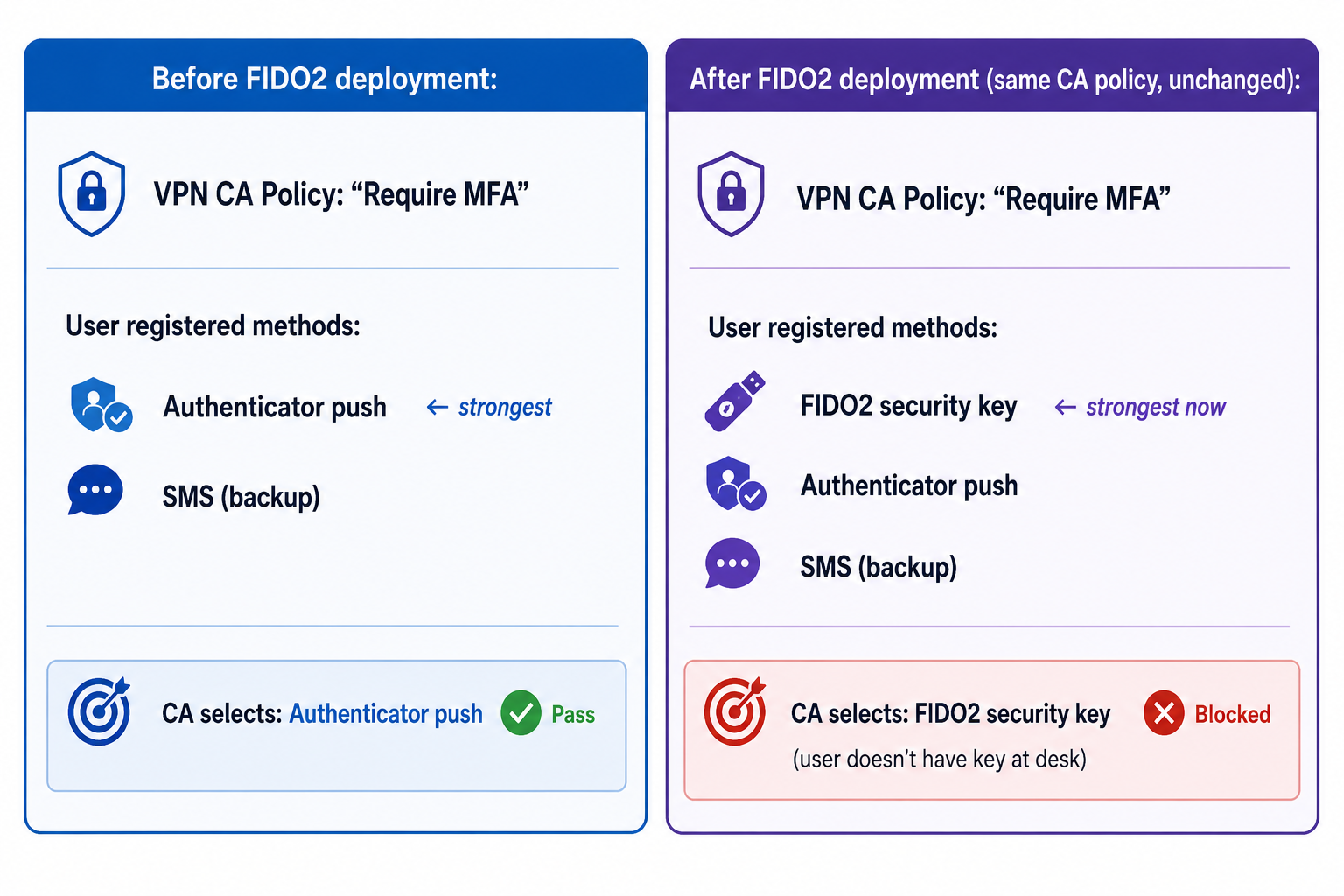
The CA policy did not change. The user's registered methods changed. That was enough.
This is not a bug. It is documented behavior. It is also the thing that bites you if you deploy FIDO2 without auditing every CA policy in the tenant for generic MFA grants.
Why It Didn't Surface Immediately
The problem existed from the moment users enrolled their FIDO2 keys. But it didn't surface immediately — and here's why: Remember MFA caching.
The VPN CA policy had "Remember MFA" enabled with a multi-hour session cache. Users who had authenticated to VPN via Authenticator push before enrolling their FIDO2 keys were carrying a cached MFA session. The CA policy evaluated the cached token, found a valid MFA session, and let them through without re-challenging.
The problem surfaced only when:
- The MFA cache expired and the user had to authenticate fresh, or
- A user connected from a new device or location that forced a new authentication
This created a confusing symptom pattern: some users were affected, others weren't. The ones whose cache hadn't expired yet had no idea a problem existed. The ones whose cache had expired got challenged for a hardware key they didn't have.
The "Remember MFA" caching was masking the problem — and delaying the blast radius, not preventing it.
Timeline:
Day 1: FIDO2 keys enrolled → problem exists but is masked by MFA cache
Day 2-3: Cache begins expiring for some users → first support tickets
Day 4+: More caches expire → tickets escalate
Day 7: "Why does VPN keep asking for the YubiKey?" → investigation begins
The lesson: disable or reduce "Remember MFA" caching before FIDO2 enforcement. A long cache duration is a liability during rollout — it hides misconfiguration and delays feedback.
Diagnosing It in the Sign-In Logs
Once we had the symptom, the diagnosis was fast. Pull the sign-in logs, filter for the VPN application, look at the CA policy evaluation for affected users.
In Entra ID → Monitoring → Sign-in logs:
- Filter by Application — set to the VPN app (FortiGate SAML app or equivalent)
- Filter by Status — "Interrupted" catches the challenge events
- Open a failed/interrupted event → Conditional Access tab → expand the VPN CA policy entry
- Look at Authentication strength — it will show which grant was evaluated
What we saw: the VPN CA policy's grant was listed as a generic MFA requirement, and the evaluated strength was FIDO2 security key — the system had selected it as the required method because it was the strongest registered method for those users.
That single sign-in log entry confirmed the root cause in under five minutes.
What to look for in your own logs:
Sign-in log → Conditional Access tab → [VPN Policy] →
  Grant Controls: Require multifactor authentication
  Authentication strength: FIDO2 Security Key
  Result: Interrupted (user needs to satisfy)
If you see authentication strength resolving to FIDO2 on a policy that was never intended to require FIDO2, you have the same issue.
Additional Finding: Audit Your Existing Custom Auth Strengths
During the investigation, we also reviewed a custom authentication strength that had been built earlier in the tenant — one that was already applied to some policies.
It had single-factor methods included.
A custom authentication strength that includes single-factor methods (password only, for example) can technically be satisfied without any MFA step. This is a silent security regression. If that auth strength is attached to a CA policy that was supposed to enforce MFA, the policy is no longer doing what you think it's doing.
After deploying FIDO2, the authentication strength landscape in your tenant deserves a full audit:
- Which custom auth strengths exist?
- What methods are included in each?
- Which CA policies reference them?
- Does the method list in each strength match the intent of the policies that use it?
This is not something most teams review after the initial CA build. It should be a standard post-FIDO2-deployment step.
The Fix
Step 1: Build a custom authentication strength for the VPN
In Entra ID → Protection → Authentication Methods → Authentication strengths → + New authentication strength.
Include the methods you want VPN to accept:
- Microsoft Authenticator (push notification)
- OATH hardware token (TOTP)
- OATH software token
- SMS (if your policy allows it as a fallback)
Explicitly exclude:
- FIDO2 security key
- Windows Hello for Business
- Certificate-based authentication (unless VPN is specifically meant to support it)
Name it clearly — something like VPN-MFA-AuthStrength — so its purpose is unambiguous when you look at it six months from now.
Step 2: Replace the generic grant in the VPN CA policy
Edit the VPN CA policy:
- Remove: "Require multifactor authentication" (the generic grant)
- Add: "Require authentication strength" → select your new
VPN-MFA-AuthStrength
This scopes the VPN policy to exactly the methods you intended, regardless of what other methods users register in the future.
Step 3: Disable or reduce Remember MFA caching
If "Remember MFA" is enabled on the VPN CA policy, remove it or reduce the session duration. A cached MFA session that masks CA evaluation is a liability — you want the policy evaluated on each authentication so you detect misconfiguration quickly.
In the VPN CA policy → Session controls → Sign-in frequency: set to a defined interval (we use 8 hours for VPN) and disable the "Persistent browser session" / Remember MFA setting.
Step 4: Test before rolling to production
Build the new policy in report-only first. Monitor the sign-in logs for the VPN application. Confirm:
- Authenticator push satisfies the new auth strength → result: success
- FIDO2 key is NOT selected as the required method → result: auth strength shows VPN methods only
- No unexpected interruptions for users in scope
Once report-only shows clean results for 24 hours, promote to enforcement.
Every CA Policy Needs This Audit
The VPN was the first symptom. It is unlikely to be the last.
Every CA policy in your tenant that uses a generic "Require multifactor authentication" grant will exhibit this behavior after FIDO2 is deployed. Common ones we find:
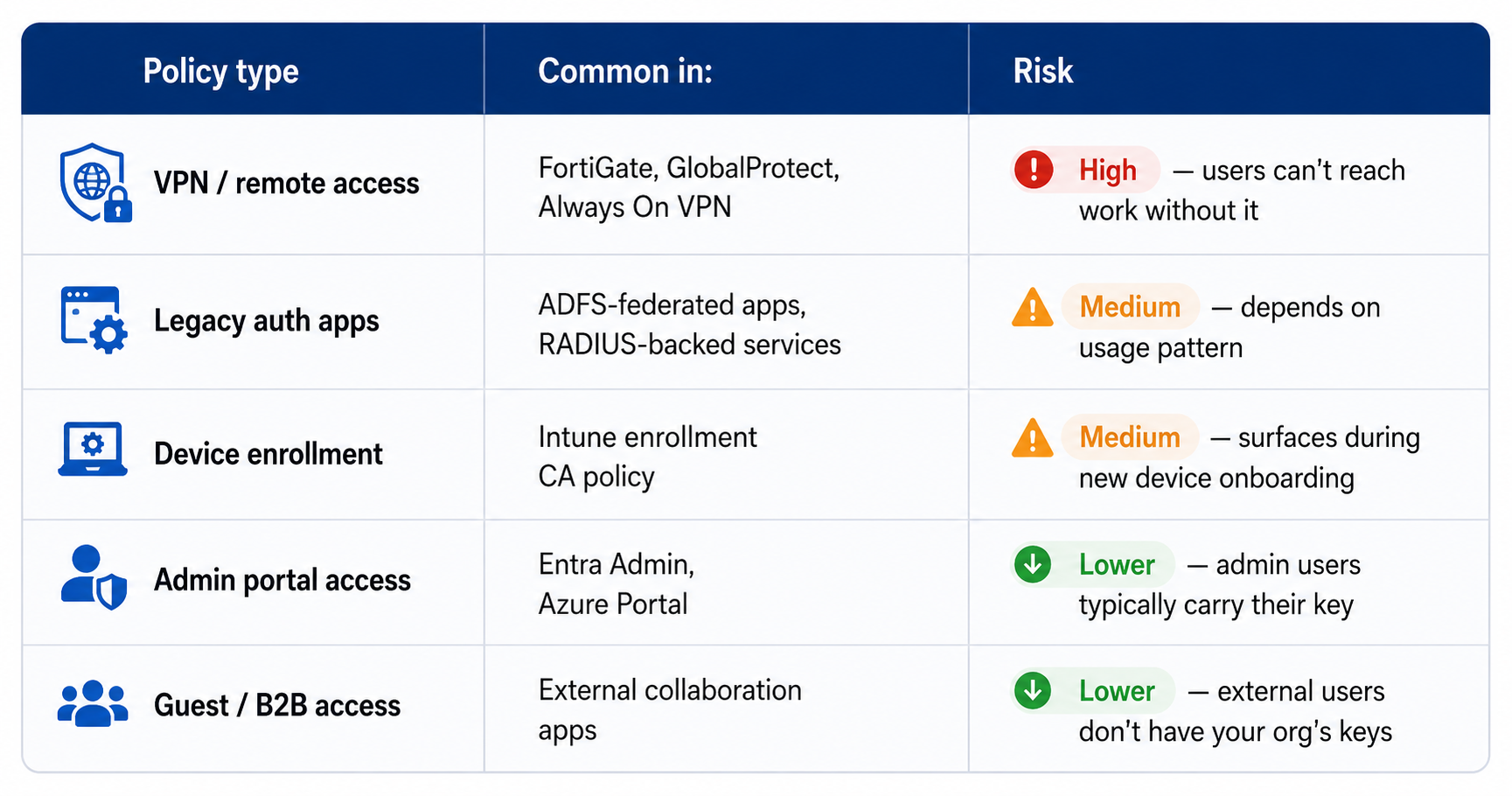
Run this query pattern against your sign-in logs after FIDO2 deployment to identify policies that are selecting FIDO2 unexpectedly:
- Pull sign-in logs for the last 7 days
- Filter: Authentication method = FIDO2 security key
- Filter: Application ≠ your FIDO2-scoped M365 apps (Exchange, SharePoint, Teams)
- Any results: those apps are having FIDO2 selected by a generic grant policy
Each result is a CA policy that needs a scoped custom authentication strength.
What Breaks Next
Part 4 of this series covers the longer tail of FIDO2 coexistence issues: Windows Hello for Business interplay, RDP scenarios, TAP misuse patterns we've observed, loaner/new device onboarding under CA enforcement, and recovery flows when a user loses their key.
The pattern in all of them is the same as VPN: FIDO2 changes the auth strength landscape in ways that generic CA grants weren't designed to handle. The fix in each case is scoped authentication strengths — but the diagnosis path is different for each resource type.
→ Real-World FIDO2 Coexistence: RDP, Legacy VPNs, TAP Misuse, and Recovery Flows
This post documents a pattern observed across multiple production FIDO2 deployments. Environment details have been generalized. All sign-in log screenshots and policy configurations were from a FortiGate SAML VPN + Entra ID environment, but the CA auth strength behavior is platform-agnostic — the same root cause applies to any VPN or app using a generic MFA grant in Entra Conditional Access.
Series navigation:
- Part 1: MFA Isn't Enough — How AiTM Phishing Bypasses Traditional MFA
- Part 2: The Zero-Lockout FIDO2 Rollout — The Exact Wave Plan We Use in Production
- Part 3: FIDO2 Broke Our FortiGate VPN — Diagnosing the CA Auth Strength Conflict (this post)
- Part 4: Real-World FIDO2 Coexistence: RDP, Legacy VPNs, TAP Misuse, and Recovery Flows
Want more patterns like this?
Get the full 6-part guide — what Intune doesn't tell you, but you'll hit in production.
Running into this in production? 30 minutes — I will tell you directly if it is worth fixing.
Book a Fit Call →